
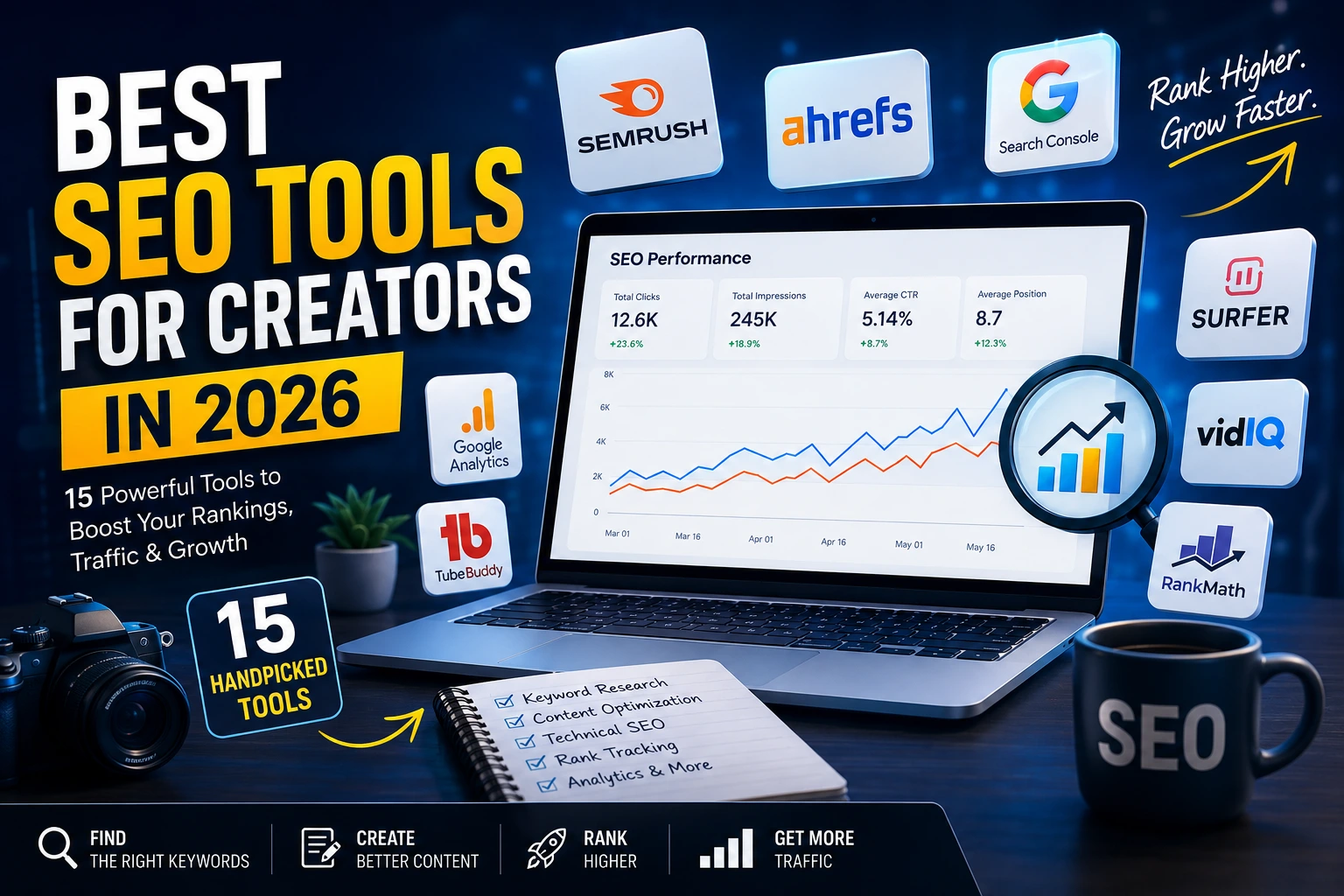
Creating great content is only half the battle.
If nobody can find your articles, videos, or website, even the most useful content can struggle to generate traffic. That’s why SEO has become an essential part of content creation in 2026.
The right SEO tools can help you discover what people are searching for, identify realistic keyword opportunities, analyze competitors, optimize your content, monitor rankings, find technical problems, and understand what is actually driving organic traffic.
But there is one problem: there are hundreds of SEO tools, and they are not all designed for the same job.
Some are excellent for keyword research. Others are better for backlinks, competitor analysis, content optimization, technical SEO, or YouTube.
So instead of giving you another generic list, this guide breaks down the best SEO tools for creators in 2026, what each tool does best, who should use it, its advantages and limitations, and how to build an SEO workflow without wasting money on tools you don’t actually need.
Quick Answer: What Are the Best SEO Tools for Creators in 2026?
If you want the short answer, these are the tools worth knowing:
- Google Search Console — Best free tool for monitoring Google Search performance
- Semrush — Best all-in-one SEO platform
- Ahrefs — Best for competitor and backlink research
- Google Trends — Best for discovering trends and topics
- Google Keyword Planner — Best free keyword discovery tool
- Ubersuggest — Best for beginners
- KWFinder — Best for lower-competition keyword research
- Surfer — Best for content optimization
- Rank Math — Best WordPress SEO plugin
- YouTube Studio — Best free analytics platform for YouTubers
- vidIQ — Best for YouTube keyword and topic research
- TubeBuddy — Best for YouTube optimization
- Screaming Frog — Best technical SEO crawler
- PageSpeed Insights — Best free performance testing tool
- AlsoAsked — Best for discovering related search questions
You don’t need all 15.
The best SEO stack depends on whether you’re a blogger, YouTuber, affiliate marketer, small business owner, or content creator.
Best SEO Tools for Creators in 2026: Comparison
| Tool | Best For | Free Option | Best For |
|---|---|---|---|
| Google Search Console | Search performance | Yes | Every website owner |
| Semrush | All-in-one SEO | Limited | Growing websites |
| Ahrefs | Backlinks & competitors | Limited | Advanced creators |
| Google Trends | Trends & topics | Yes | All creators |
| Google Keyword Planner | Keyword discovery | Yes | Beginners |
| Ubersuggest | Simple SEO research | Limited | Beginners |
| KWFinder | Long-tail keywords | Limited | Small websites |
| Surfer | Content optimization | Limited | Bloggers |
| Rank Math | WordPress SEO | Yes | WordPress creators |
| YouTube Studio | YouTube analytics | Yes | YouTubers |
| vidIQ | YouTube research | Limited | YouTubers |
| TubeBuddy | YouTube optimization | Limited | YouTubers |
| Screaming Frog | Technical SEO | Limited | Advanced websites |
| PageSpeed Insights | Website performance | Yes | Every website |
| AlsoAsked | Related questions | Limited | Content creators |
1. Google Search Console — Best Free SEO Tool for Creators
If you own a website, Google Search Console should be one of the first SEO tools you use.
Unlike many third-party SEO platforms, Search Console provides information directly about how your website performs in Google Search.
You can monitor:
- Clicks
- Impressions
- Click-through rate
- Average position
- Search queries
- Pages
- Countries
- Devices
Google’s official Search Console Performance report documentation explains that the Performance report allows website owners to see clicks, impressions, CTR, average position, queries, pages, and other dimensions.
This becomes particularly useful after publishing an article.
For example, you may publish an article targeting:
best SEO tools for creators
After Google starts indexing and displaying the article, Search Console may show that the page is also appearing for related searches such as:
- best SEO tools for bloggers
- SEO tools for content creators
- free SEO tools for beginners
- SEO tools for YouTubers
Those additional queries can reveal opportunities to improve your article or create supporting content.
Pros
- Completely free
- First-party Google Search data
- Excellent performance monitoring
- Useful query data
- Essential for websites
Cons
- Not a complete competitor research platform
- Doesn’t provide the depth of keyword data found in premium SEO platforms
Best for: Every website creator.
Verdict: Essential.
2. Semrush — Best All-in-One SEO Platform
Semrush is one of the most comprehensive SEO platforms available to creators.
Its Keyword Magic Tool provides keyword suggestions alongside metrics such as search volume, keyword difficulty, search intent, and CPC. Semrush’s official documentation explains that the tool can also organize related keywords into topic groups and apply filters to identify more specific opportunities.
This makes it useful when you don’t simply want a list of keywords—you want to build an actual keyword strategy.
For example, instead of targeting an extremely broad term such as:
SEO tools
you could investigate more specific opportunities:
- SEO tools for bloggers
- SEO tools for content creators
- SEO tools for small websites
- SEO tools for YouTubers
- free SEO tools for creators
Semrush can also help with competitor research, keyword gaps, rank tracking, site audits, content research, and other SEO workflows.
Pros
- Powerful keyword research
- Competitor analysis
- Keyword gap analysis
- Technical SEO tools
- Rank tracking
- Search intent data
- Large keyword database
Cons
- Can be overwhelming for beginners
- Many advanced features require a paid plan
Best for: Serious bloggers, publishers, marketers, and growing websites.
Verdict: One of the strongest all-in-one SEO platforms for creators who need advanced research.
3. Ahrefs — Best for Competitor and Backlink Research
Ahrefs is particularly powerful when your goal is to understand why competing pages rank.
Its Keywords Explorer provides keyword ideas and metrics such as search volume, Keyword Difficulty, and Traffic Potential.
One of the most useful concepts in Ahrefs is Traffic Potential.
A keyword may have relatively modest search volume but still represent a much larger traffic opportunity because the page ranking for that topic can receive traffic from hundreds or thousands of related keywords.
Ahrefs explains that Traffic Potential represents the organic traffic received by the current top-ranking page from the keywords for which it ranks.
Ahrefs also provides Keyword Difficulty, but you shouldn’t blindly trust any difficulty score.
Ahrefs itself recommends manually reviewing the top-ranking pages because its KD metric primarily estimates backlink-based competition and does not account for every on-page factor.
Pros
- Excellent competitor research
- Powerful backlink analysis
- Keyword research
- Traffic Potential
- SERP analysis
- Content gap research
Cons
- Can be expensive for beginners
- Advanced features take time to learn
Best for: Advanced bloggers, publishers, affiliate marketers, and SEO professionals.
Verdict: One of the strongest tools for serious competitor and backlink research.
4. Google Trends — Best for Discovering Trending Topics
Google Trends is one of the most useful free tools for content creators.
Instead of focusing only on keyword volume, it helps you understand how search interest changes over time.
You can use Google Trends to:
- Compare topics
- Analyze search interest
- Discover rising topics
- Investigate seasonal trends
- Compare different countries
- Find related search interests
For example, you could compare:
- AI video tools
- AI image tools
- AI writing tools
If interest in one topic is rising while another is declining, that information can influence your content calendar.
Google Trends also allows creators to explore what people are searching for right now.
Best for: Topic research, trends, seasonal content, and content planning.
Price: Free.
Verdict: A must-have free tool for creators.
5. Google Keyword Planner — Best Free Keyword Discovery Tool
Google Keyword Planner was designed primarily for Google Ads, but it can also be useful during keyword research.
Google’s official documentation says Keyword Planner can help you discover new keywords and view estimates for monthly searches.
You can use it to discover:
- Keyword ideas
- Related terms
- Monthly search estimates
- Keyword variations
- Commercial opportunities
However, don’t use Keyword Planner as your entire SEO strategy.
Combine it with:
Google Search Console + Google Trends + SERP analysis
for a much stronger research process.
Best for: Beginners and creators looking for a free keyword research starting point.
Verdict: Excellent foundation for keyword discovery.
6. Ubersuggest — Best SEO Tool for Beginners
Ubersuggest focuses on making SEO research easier for beginners.
It can help with:
- Keyword research
- Content ideas
- Competitor research
- Backlink research
- SEO difficulty
Its biggest advantage is simplicity.
If you’re completely new to SEO, an easy-to-understand interface can be more useful than opening an advanced platform with hundreds of reports.
Pros
- Beginner-friendly
- Easy keyword research
- Content ideas
- Competitor research
Cons
- Not as comprehensive as advanced SEO platforms
- Some features depend on the plan
Best for: Beginners and small websites.
Verdict: A practical entry point into SEO.
7. KWFinder — Best for Lower-Competition Keywords
One of the biggest mistakes new websites make is targeting keywords that are far too competitive.
A new website probably shouldn’t begin by targeting an enormous keyword such as:
SEO
A more realistic strategy may involve specific long-tail keywords such as:
- best SEO tools for small bloggers
- SEO tools for new websites
- best SEO tools for content creators
- free SEO tools for beginners
KWFinder focuses heavily on keyword research and competition analysis, making it useful for this type of strategy.
But remember:
Search volume should never be the only metric you consider.
You also need to evaluate:
- Competition
- Search intent
- Relevance
- SERP quality
- Traffic potential
Best for: Smaller websites and creators targeting long-tail opportunities.
Verdict: Useful for building a realistic keyword strategy.
8. Surfer — Best for Content Optimization
Keyword research tells you what people are searching for.
Content optimization helps you understand what your article should cover.
Surfer is designed to help creators optimize content around a target search query by analyzing the topics and terms associated with competing pages.
This can be useful for long-form content.
But there’s an important warning:
Don’t write an article just to achieve a perfect optimization score.
A high content score does not guarantee a Google ranking.
Your article still needs:
- Original information
- Useful examples
- Accurate facts
- Strong structure
- Clear explanations
- Genuine value for the reader
Best for: Bloggers and long-form content creators.
Verdict: A useful optimization assistant, but human judgment should remain in control.
9. Rank Math — Best WordPress SEO Plugin
If your website runs on WordPress, Rank Math can simplify many SEO tasks directly inside your dashboard.
Depending on your setup and plan, it can help with:
- SEO titles
- Meta descriptions
- XML sitemaps
- Schema
- Redirects
- On-page SEO
- Robots settings
- Search Console integration
The biggest advantage is convenience.
Instead of manually managing every SEO setting, you can control many of them directly from WordPress.
Best for: WordPress bloggers and website owners.
Verdict: A useful part of a WordPress SEO stack.
10. YouTube Studio — Best Free Analytics Tool for YouTubers
Website SEO and YouTube SEO aren’t exactly the same.
If YouTube is your main traffic source, YouTube Studio should be your starting point.
YouTube’s official documentation explains that Analytics includes reports covering areas such as Reach, Engagement, Audience, Revenue, and Trends. The Reach section includes metrics such as impressions and impressions click-through rate, while Engagement includes watch time and average view duration.
This allows creators to understand:
- How viewers discover their videos
- How many impressions videos receive
- How often viewers click
- How long viewers watch
- Which content attracts viewers
- What topics may deserve more videos
YouTube’s Trends section can also help creators discover content gaps and ideas for future videos.
Best for: Every YouTube creator.
Price: Free.
Verdict: Essential for YouTubers.
11. vidIQ — Best for YouTube Keyword and Topic Research
vidIQ is built specifically around YouTube creators.
Instead of focusing primarily on traditional Google website SEO, it helps creators research:
- Video topics
- Keywords
- Competitors
- Content opportunities
It can be particularly useful when you want additional research capabilities beyond YouTube Studio.
Best for: YouTubers who want additional keyword and topic research.
Verdict: A useful specialist tool for video creators.
12. TubeBuddy — Best for YouTube Optimization
TubeBuddy is another platform built around YouTube creators.
Depending on the plan and features available, it can help with areas such as:
- Keyword research
- Video optimization
- Channel management
- Metadata
- Thumbnail testing
- Creator productivity
Best for: YouTubers who want additional optimization and workflow features.
Verdict: A useful complement to YouTube Studio.
13. Screaming Frog — Best Technical SEO Crawler
As your website grows, technical SEO becomes increasingly important.
Screaming Frog SEO Spider can crawl websites and help identify issues involving:
- Broken links
- Missing title tags
- Missing meta descriptions
- Duplicate pages
- Redirects
- Canonical tags
- Indexability
It’s particularly useful for websites with hundreds or thousands of URLs.
For a brand-new website with only a few pages, however, you probably don’t need to make a crawler the center of your SEO strategy.
Best for: Advanced creators, publishers, agencies, and larger websites.
Verdict: Excellent for technical SEO audits.
14. PageSpeed Insights — Best Free Website Performance Tool
SEO isn’t only about keywords.
Your website also needs to provide a good experience for visitors.
PageSpeed Insights allows you to test page performance and identify potential improvements.
You can test your pages using Google PageSpeed Insights.
For a content website, test important pages such as:
- Homepage
- Category pages
- Top articles
- Landing pages
Best for: Every website owner.
Price: Free.
Verdict: One of the best free performance tools available.
15. AlsoAsked — Best for Discovering Related Search Questions
Sometimes the easiest way to make an article more comprehensive is to understand the questions surrounding the main topic.
For example, someone searching for:
best SEO tools for creators
may also want answers to:
- What is the best free SEO tool?
- Which SEO tool is best for beginners?
- What SEO tools do bloggers use?
- Are SEO tools worth paying for?
- What is the best SEO tool for YouTube?
These related questions can become:
- H2 sections
- H3 sections
- FAQ questions
- Supporting articles
This helps you build content around the broader topic rather than focusing on one keyword repeatedly.
Best for: Content creators building comprehensive articles.
Verdict: Useful for expanding topic coverage.
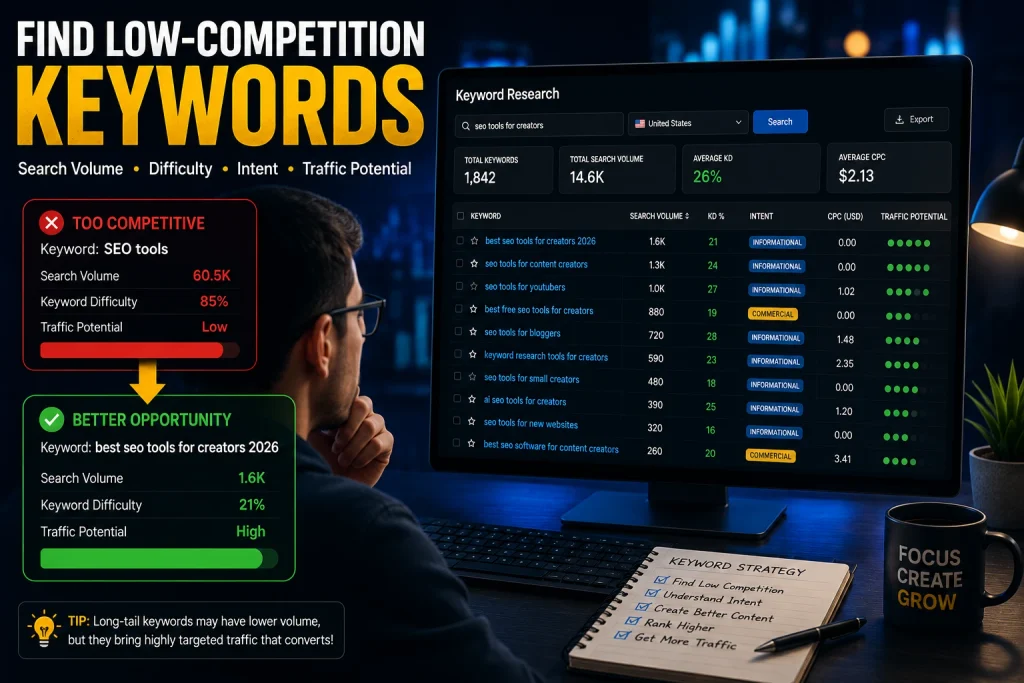
How to Find Low-Competition Keywords as a Small Creator
This is where many new websites go wrong.
They find a keyword with a huge search volume and immediately decide:
“This is the keyword I need.”
Not necessarily.
Instead, evaluate at least five things.
1. Search Volume
How much demand does the keyword have?
Search volume is useful, but it shouldn’t determine your decision by itself.
2. Keyword Difficulty
How difficult is the keyword likely to be?
SEO platforms provide difficulty estimates, but these are not absolute measurements.
For example, Ahrefs’ Keyword Difficulty is primarily based on the backlink profiles of top-ranking pages, and Ahrefs recommends manually analyzing the SERP for a more complete assessment.
3. Search Intent
What does the person actually want?
A keyword may have high volume but still be a terrible target if your content doesn’t satisfy the searcher’s intent.
4. Traffic Potential
Could ranking for the topic generate traffic from many related searches?
This is why Traffic Potential can sometimes be more useful than looking at search volume alone. Ahrefs explains that the top-ranking page for a topic may receive traffic from many keywords beyond the exact term you’re researching.
5. SERP Quality
Search the keyword manually.
Then ask:
- Are the ranking articles genuinely excellent?
- Are they outdated?
- Are they answering the wrong intent?
- Are there obvious content gaps?
- Are weaker websites ranking?
This final step is extremely important.
A keyword difficulty score is not a replacement for looking at Google yourself.
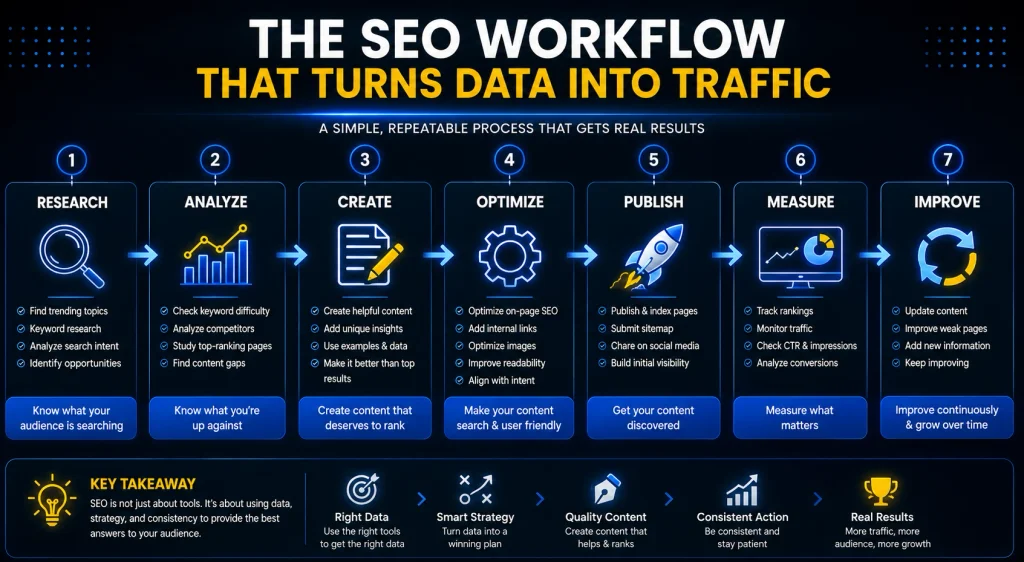
How to Use SEO Tools to Actually Get More Traffic
Buying an SEO tool doesn’t create traffic.
The advantage comes from turning the data into better decisions.
Step 1: Find a Topic
Use Google Trends, Search Console, keyword research tools, YouTube research, or competitor analysis to identify a topic your audience actually cares about.
Step 2: Research the Keyword
Find the primary keyword and related searches.
Look at:
- Search volume
- Competition
- Search intent
- Traffic potential
Step 3: Analyze the SERP
Search the keyword yourself.
Study the first-page results and identify:
- What they cover
- What they don’t cover
- How current they are
- What type of content Google is rewarding
Step 4: Match Search Intent
If people want a comparison, create a comparison.
If they want a tutorial, create a tutorial.
If they want recommendations, help them choose.
Your content format should match the reason behind the search.
Step 5: Add Original Value
Don’t write another article that simply says:
Tool X is great. Tool Y is also great.
Explain:
- Who should use each tool
- What problem it solves
- Where it is strongest
- Where it falls short
- When a cheaper alternative makes sense
That’s what makes content genuinely useful.
Step 6: Add Internal Links
Connect related articles across your website.
For example, a creator-focused SEO article can naturally link to related TechVello content about:
- AI SEO tools
- AI tools for content creators
- AI marketing tools
- Content creation tools
- Business software
Use descriptive anchor text rather than repeatedly using generic phrases such as “click here.”
Step 7: Monitor Google Search Console
After publishing, monitor:
- Impressions
- Clicks
- CTR
- Average position
- Search queries
Google confirms that these are core metrics in the Search Console Performance report.
Step 8: Improve the Page
SEO shouldn’t be a one-time activity.
A better workflow is:
Publish → Measure → Analyze → Improve → Measure Again
If impressions increase but clicks remain weak, investigate your title and search snippet.
If the article starts appearing for related queries, improve the relevant sections.
If the page is stuck around positions 8–20, analyze the current SERP again and look for ways to make your content more useful than the competing pages.
Free vs. Paid SEO Tools: Which Should You Choose?
You don’t need an expensive SEO subscription simply because successful websites use one.
Many creators can build a strong foundation using free tools.
Best Free SEO Stack
Google Search Console — Search performance
Google Trends — Topic and trend research
Google Keyword Planner — Keyword discovery
PageSpeed Insights — Website performance
YouTube Studio — YouTube analytics
Rank Math — WordPress SEO basics
When Should You Pay for an SEO Tool?
A paid platform becomes more valuable when you need:
- Large-scale keyword research
- Advanced competitor research
- Backlink analysis
- Keyword gap analysis
- Rank tracking
- Technical auditing
- Advanced content research
The important question isn’t:
“Which SEO tool has the most features?”
It’s:
“Which SEO data will actually improve my decisions?”
SEO Mistakes Creators Should Avoid
Targeting Only High-Volume Keywords
Huge search volume doesn’t automatically mean a keyword is a good opportunity.
Relevance, competition, intent, and traffic potential matter too.
Keyword Stuffing
Repeating the same keyword dozens of times doesn’t make content better.
Use natural language and cover the subject properly.
Writing Only for Search Engines
Your reader should always come first.
Google’s official guidance on creating helpful, reliable, people-first content emphasizes creating content primarily to help people rather than content created mainly to manipulate search rankings.
Copying Competitors
Use competing pages for research—not imitation.
Find what they missed and provide something more useful.
Publishing Huge Articles Without Substance
More words don’t automatically equal better SEO.
A useful 2,000-word article can be better than a 5,000-word article filled with repetition.
Publishing AI Content Without Human Review
AI can speed up research and drafting, but creators still need to:
- Verify facts
- Add original insights
- Improve examples
- Remove repetition
- Check accuracy
- Make sure the final article genuinely helps the reader
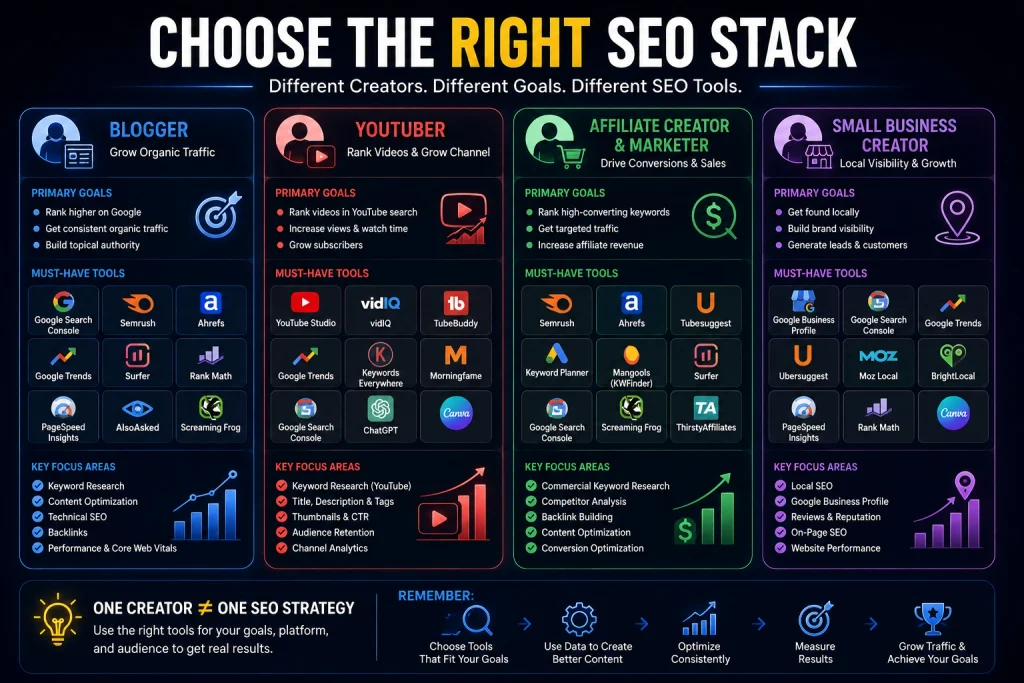
Best SEO Tools for Different Types of Creators
Best SEO Tools for Bloggers
A strong combination is:
Google Search Console + Google Trends + Semrush or Ahrefs + Rank Math + PageSpeed Insights
This covers:
- Search performance
- Keyword research
- Topic research
- Competitor analysis
- On-page SEO
- Technical SEO
- Performance
Best SEO Tools for YouTubers
A practical YouTube stack is:
YouTube Studio + Google Trends + vidIQ or TubeBuddy
YouTube Studio provides first-party analytics, while specialist tools can add more research and optimization capabilities.
Best SEO Tools for Beginners
Start with:
- Google Search Console
- Google Trends
- Google Keyword Planner
- PageSpeed Insights
- Rank Math
- YouTube Studio if you publish videos
You can build a surprisingly strong foundation without paying for an expensive SEO platform.
Final Ranking: Best SEO Tools for Creators in 2026
| Rank | Tool | Best Use |
|---|---|---|
| 1 | Semrush | Overall SEO research |
| 2 | Ahrefs | Competitor and backlink research |
| 3 | Google Search Console | Free search performance |
| 4 | Google Trends | Trends and topic research |
| 5 | Google Keyword Planner | Free keyword discovery |
| 6 | KWFinder | Lower-competition keywords |
| 7 | Surfer | Content optimization |
| 8 | Rank Math | WordPress SEO |
| 9 | Ubersuggest | Beginner SEO |
| 10 | YouTube Studio | YouTube analytics |
| 11 | vidIQ | YouTube research |
| 12 | TubeBuddy | YouTube optimization |
| 13 | Screaming Frog | Technical SEO |
| 14 | PageSpeed Insights | Website performance |
| 15 | AlsoAsked | Related search questions |
Frequently Asked Questions
What are the best SEO tools for creators in 2026?
The strongest options include Semrush, Ahrefs, Google Search Console, Google Trends, Google Keyword Planner, KWFinder, Surfer, and Rank Math. YouTubers can also benefit from YouTube Studio, vidIQ, and TubeBuddy.
What is the best free SEO tool for creators?
Google Search Console is one of the most useful free SEO tools because it provides first-party information about how your website performs in Google Search, including clicks, impressions, CTR, and average position.
What is the best SEO tool for bloggers?
For bloggers, a combination of Google Search Console, Google Trends, Semrush or Ahrefs, Rank Math, and PageSpeed Insights provides a strong SEO workflow.
What is the best SEO tool for YouTubers?
YouTube Studio should be the foundation because it provides first-party performance data. Tools such as vidIQ and TubeBuddy can complement it with additional research and optimization features.
Can I do SEO without paying for tools?
Yes.
Google Search Console, Google Trends, Google Keyword Planner, PageSpeed Insights, and other free resources can provide a strong starting point.
Are paid SEO tools worth it?
They can be worth the investment when you need advanced competitor research, keyword databases, backlink analysis, rank tracking, content research, or technical SEO capabilities.
Do SEO tools guarantee Google rankings?
No.
SEO tools provide data, estimates, and research capabilities. They cannot guarantee that a page will reach a particular Google position.
How many SEO tools do I need?
Most creators don’t need dozens of tools.
A small stack covering keyword research, performance monitoring, technical SEO, and content analysis is usually enough.
Are AI SEO tools useful?
Yes.
AI can help with research, content planning, organization, and optimization. However, creators should still provide original insight, verify information, and make the final content genuinely useful to readers.
Final Verdict: What Is the Best SEO Tool for Creators?
There isn’t one SEO tool that’s perfect for every creator.
If you’re a beginner, start with Google Search Console, Google Trends, Google Keyword Planner, and PageSpeed Insights.
If you’re building a serious blog, consider adding Semrush or Ahrefs for deeper keyword, competitor, and backlink research.
If YouTube is your main platform, make YouTube Studio the foundation of your analytics workflow and use specialist tools such as vidIQ or TubeBuddy when you need additional research.
If you’re using WordPress, Rank Math can simplify many on-page and technical SEO tasks.
But the most important lesson is this:
The best SEO tool isn’t necessarily the one with the most features. It’s the one that helps you make better decisions.
Use SEO tools to find opportunities.
Use your own analysis to decide which opportunities are worth pursuing.
Then create content that genuinely helps the person searching.
The most effective workflow is simple:
Find demand → Analyze competition → Understand search intent → Create better content → Optimize it → Build internal links → Measure results → Improve.
That’s how creators turn SEO tools from expensive dashboards into actual growth opportunities.
What Is a Digital Creator? Definition, Types, Skills, Income & AI Tools in 2026
What is a digital creator? A digital creator is someone who creates and publishes original content using digital platforms, tools, and technology to reach an online audience. Digital creators can…

Best AI Course Creator Tools in 2026: Comparison, Pricing & Features
Creating an online course used to mean spending days—or even weeks—planning lessons, writing scripts, creating quizzes, designing course pages, and setting up a platform to sell everything. In 2026, AI…

Best AI SEO Tools in 2026: 15 Tools Worth Using
The best AI SEO tools in 2026 can help you discover keyword opportunities, analyze search results, build content briefs, optimize existing articles, identify technical problems, and turn large amounts of…

How to Make Money With Content Rewards in 2026:
What if you could use the social media accounts you already have to earn money from short-form videos—without waiting to become a huge influencer? That is the basic idea behind…
15 AI SEO Tools in 2026 That Can Improve Your Search Rankings
15 AI SEO Tools in 2026 That Can Improve Your Search Rankings How do you optimize content for traditional search while also making it useful and understandable for AI-powered search?…

Best AI Content Repurposing Tools in 2026 | Turn 1 Into 10
Best AI Content Repurposing Tools in 2026: Turn One Piece Into 10+ Creating great content takes time. But what if you didn’t have to create completely new content for every…

10 Best AI Video Generators for Content Creators in 2026
10 Best AI Video Generators for Content Creators in 2026 Creating high-quality video content used to require cameras, lighting, microphones, actors, editing software, and hours of work. In 2026, that’s…
Best AI Tools for Content Creators in 2026: 25+ Tools Worth Trying
Creating content in 2026 is easier than ever—but there are also more tools to choose from than ever before. AI can help creators brainstorm ideas, write scripts, generate images, edit…