
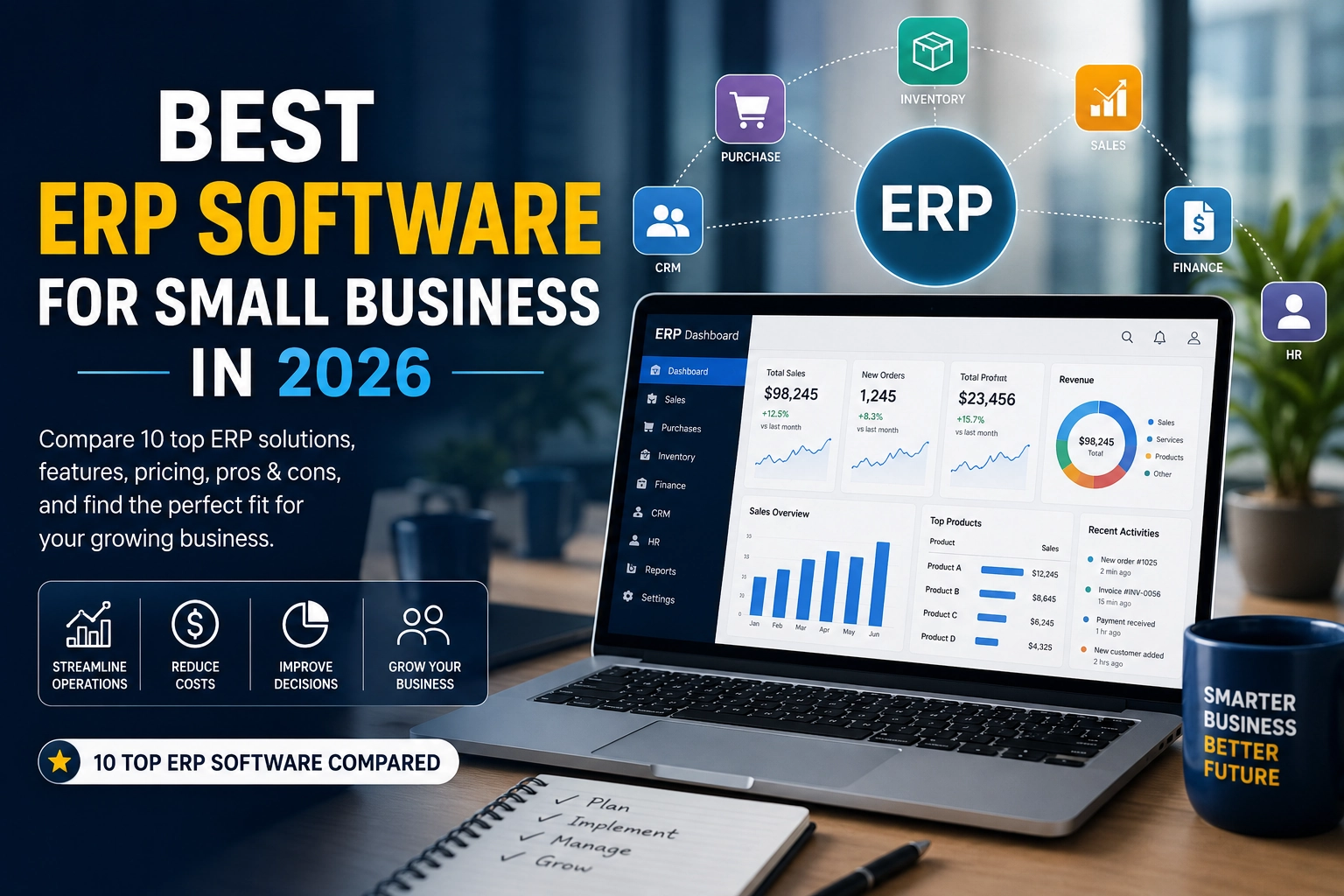
Best ERP Software for Small Business in 2026: 10 Top Solutions Compared
Running a small business often means juggling accounting, sales, inventory, purchasing, customer relationships, projects, and reporting across several different tools. As a company grows, spreadsheets and disconnected applications can quickly become difficult to manage.
That is where ERP software for small business can make a major difference.
An Enterprise Resource Planning (ERP) system brings essential business processes into one central platform. Instead of switching between separate systems for accounting, inventory, sales, CRM, and operations, an ERP can connect these functions and give your team a shared view of the business.
But not every ERP is suitable for a small company. Some platforms are affordable and relatively easy to deploy, while others are designed for organizations with larger budgets, complex operations, and dedicated IT teams.
In this guide, we compare some of the best ERP software for small businesses in 2026, including Odoo, Microsoft Dynamics 365 Business Central, Oracle NetSuite, Acumatica, SAP Business One, Sage Intacct, ERPNext, and other notable options.
Quick Answer: What Is the Best ERP Software for Small Business?
There is no single ERP that is perfect for every small business.
For many small companies looking for broad functionality at a relatively accessible price, Odoo is one of the strongest options. Its current Standard plan starts at $24.90 per user per month when billed annually and includes access to all Odoo applications.
For businesses already heavily invested in Microsoft’s ecosystem, Microsoft Dynamics 365 Business Central is a strong choice. Its Essentials plan is currently listed at $80 per user per month, while Premium is $110 per user per month, both paid yearly.
For businesses prioritizing long-term scalability and more sophisticated enterprise functionality, Oracle NetSuite and Acumatica are worth considering, although implementation and total ownership costs can be substantially higher.
For technically capable businesses wanting an open-source option, ERPNext can be particularly attractive.
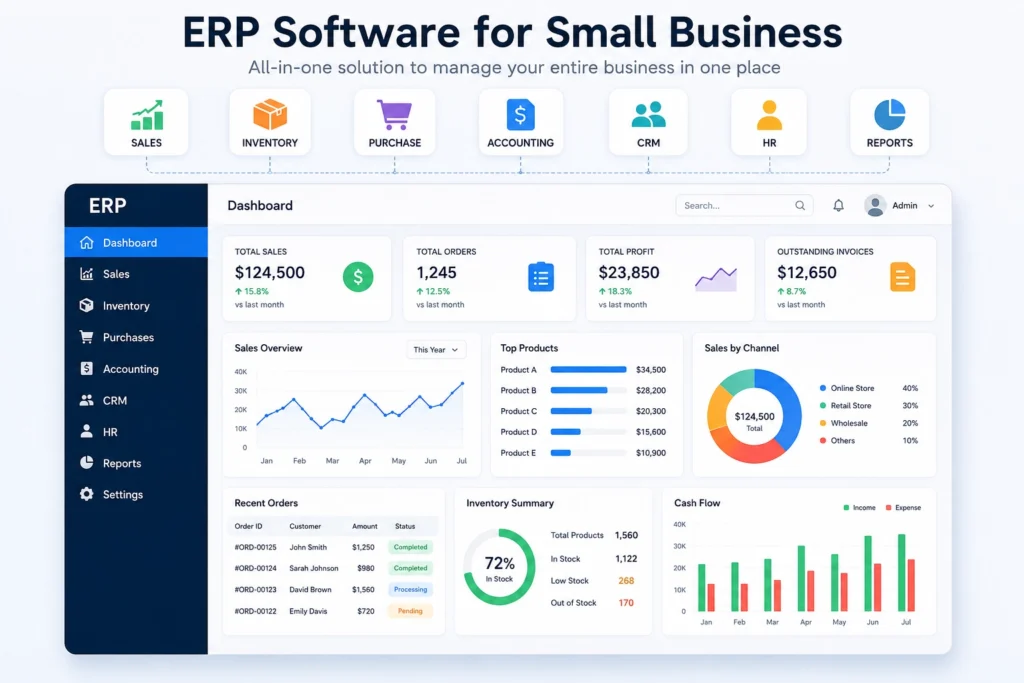
Best ERP Software for Small Business in 2026
Here are our top picks based on affordability, features, scalability, usability, and the type of business each platform is best suited for.
| ERP Software | Best For | Starting Price* | Main Strength |
|---|---|---|---|
| Odoo | Most small businesses | $24.90/user/month | Broad functionality and value |
| Microsoft Dynamics 365 Business Central | Microsoft users | $80/user/month | Microsoft ecosystem |
| Oracle NetSuite | Fast-growing businesses | Custom | Scalability |
| Acumatica | Growing companies with many users | Custom | Flexible cloud ERP |
| SAP Business One | Manufacturing & distribution | Custom | Deep business management |
| Sage Intacct | Finance-focused businesses | Custom | Financial management |
| ERPNext | Open-source users | Free self-hosted option | Flexibility and ownership |
| Sage 100 | Established small businesses | Custom | Mature business management |
| Cetec ERP | Small manufacturers | From around $40/user/month | Manufacturing focus |
| QuickBooks + ERP/operational tools | Businesses not ready for full ERP | Varies | Simpler transition |
*ERP pricing varies by country, billing method, users, modules, implementation, and additional services. Always verify current pricing with the vendor before purchasing.
1. Odoo — Best Overall ERP for Many Small Businesses
Best for: Small businesses looking for broad functionality without immediately moving into a high-cost enterprise system.
Odoo is one of the most recognizable ERP platforms for small and growing businesses because it combines a large collection of business applications into one ecosystem.
Its modules cover areas such as:
- Accounting
- CRM
- Sales
- Inventory
- Purchasing
- Manufacturing
- Human resources
- Project management
- eCommerce
- Website management
- Point of sale
- Marketing
- Helpdesk
Odoo currently lists a Standard plan at $24.90 per user per month when billed annually, with access to all applications through Odoo Online. Its Custom plan is listed at $49 per user per month when billed annually and adds options such as Odoo Studio, multi-company functionality, external API access, and additional deployment choices.
Pros
- Large range of integrated applications
- Competitive entry-level pricing
- Flexible modular structure
- Cloud and other deployment options
- Suitable for businesses that want to expand functionality over time
Cons
- Advanced implementations can become complicated
- Customization may require technical expertise
- Implementation costs can vary significantly
Verdict
If you want an ERP that can start relatively small and expand with your company, Odoo is one of the first platforms worth evaluating.
2. Microsoft Dynamics 365 Business Central — Best for Microsoft Users
Best for: Businesses already using Microsoft 365, Teams, Excel, or other Microsoft technologies.
Microsoft Dynamics 365 Business Central connects finance, sales, service, and operations in one business management platform.
Microsoft currently lists Business Central Essentials at $80 per user per month, paid yearly. The Premium plan costs $110 per user per month and adds enhanced service management and manufacturing capabilities. A Team Members license is listed at $8 per user per month for limited access.
Business Central is particularly interesting for companies already comfortable with Microsoft products because it can fit naturally into an existing technology environment.
Pros
- Strong financial and operational capabilities
- Excellent Microsoft ecosystem integration
- Scalable
- Copilot capabilities included in the base product
- Suitable for growing organizations
Cons
- More expensive than entry-level ERP options
- Implementation may require a Microsoft partner
- Can be more complex than a small company actually needs
Verdict
If your business already depends heavily on Microsoft products, Business Central deserves serious consideration.
For small and midsize businesses looking for an integrated ERP platform, Microsoft Dynamics 365 Business Central combines finance, sales, service, projects and supply-chain management in one system
3. Oracle NetSuite — Best for Fast-Growing Businesses
Best for: Companies expecting significant growth and needing a scalable cloud ERP.
Oracle NetSuite is designed for organizations that need more advanced business management and scalability.
It can support functions such as:
- Financial management
- CRM
- Inventory
- Order management
- Procurement
- Analytics
- Multi-company operations
- Revenue management
NetSuite is often more appropriate for a growing business than a very small company that only needs basic accounting and invoicing.
The major advantage is scalability. Instead of selecting the cheapest ERP today and replacing it when the business becomes more complex, a company can choose a platform capable of supporting substantially more sophisticated operations.
Pros
- Strong scalability
- Cloud-first architecture
- Extensive functionality
- Suitable for multi-entity businesses
- Strong reporting and financial capabilities
Cons
- Higher total cost
- Pricing is typically customized
- Implementation can require significant planning
- May be excessive for very small businesses
Verdict
NetSuite makes more sense when your company has a clear growth trajectory and expects its operational requirements to become significantly more sophisticated.
4. Acumatica — Best for Growing Businesses With Many Users
Best for: Businesses that need a flexible cloud ERP and may have many employees accessing the system.
Acumatica is another strong option for small and mid-sized businesses, particularly companies looking for an ERP that can grow alongside their operations.
The platform focuses on areas such as financial management, distribution, manufacturing, project accounting, field service, and customer management.
One advantage of Acumatica is that its licensing approach can be attractive for organizations where many employees need access to business data.
Pros
- Cloud-based
- Highly scalable
- Strong operational functionality
- Suitable for distribution and manufacturing
- Flexible user model
Cons
- Pricing is generally customized
- Implementation requires planning
- May be more than a very small business needs
Verdict
Acumatica is worth considering when user growth and operational complexity are more important than finding the cheapest ERP subscription.
5. SAP Business One — Best for Manufacturing and Distribution
Best for: Small and midsize manufacturers, distributors, and businesses that want an ERP from the SAP ecosystem.
SAP Business One is designed specifically to help smaller organizations manage core business processes.
It can cover areas such as:
- Financial management
- Purchasing
- Inventory
- Sales
- Customer management
- Reporting
- Production
- Business intelligence
The platform can be particularly useful for companies with physical products and more complicated supply chains.
Pros
- Strong business management capabilities
- Excellent for manufacturing and distribution
- Established enterprise software ecosystem
- Scalable
Cons
- Can require significant implementation work
- More expensive than lightweight ERP platforms
- May be excessive for service-based microbusinesses
Verdict
If your business involves manufacturing, inventory, distribution, or complex purchasing processes, SAP Business One is worth putting on your shortlist.
Another established option is SAP Business One, which is designed for small businesses and covers accounting, purchasing, inventory, sales, CRM, reporting and analytics.
6. Sage Intacct — Best for Finance-Focused Businesses
Best for: Service companies and growing businesses that prioritize financial management.
Sage Intacct is particularly focused on accounting and financial management rather than trying to be everything to everyone.
Its capabilities include:
- Accounts payable
- Accounts receivable
- Financial reporting
- Dashboards
- Automation
- Cash-flow visibility
- Multi-dimensional financial analysis
Sage says Intacct pricing is customized according to factors such as organization size and selected modules, so there is no universal public starting price.
Pros
- Strong financial capabilities
- Powerful reporting
- Automation
- Scalable financial platform
- Good fit for finance-heavy organizations
Cons
- Custom pricing
- Less of an all-purpose ERP than some alternatives
- Additional modules can increase total cost
Verdict
If financial management is the center of your ERP requirements, Sage Intacct deserves a closer look.
7. ERPNext — Best Open-Source ERP
Best for: Technically capable businesses that want an open-source ERP.
ERPNext is an open-source ERP platform covering areas such as accounting, inventory, sales, purchasing, manufacturing, projects, CRM, and human resources.
One of its biggest advantages is flexibility. Businesses with technical expertise can self-host and customize the platform instead of depending entirely on a proprietary vendor.
That can make ERPNext particularly attractive for organizations that have developers or technical teams.
Pros
- Open source
- Highly customizable
- Self-hosting option
- Broad ERP functionality
- Potentially low software licensing cost
Cons
- Self-hosting requires technical knowledge
- Support and implementation depend on the chosen setup
- Customization can create maintenance responsibilities
Verdict
ERPNext is an excellent option if you value control and have the technical capability to manage an open-source ERP environment.
8. Sage 100 — Best for Established Small Businesses
Sage 100 is another option for established small businesses that need mature accounting and business-management functionality.
It can be particularly relevant for businesses that are not looking for the newest cloud-first ERP experience but still need more advanced business processes than basic accounting software provides.
Best for
- Established businesses
- Accounting-heavy operations
- Businesses already familiar with Sage
- Companies with more traditional workflows
Verdict
Sage 100 is worth considering if stability and established workflows matter more to your business than adopting a modern cloud-first platform.
9. Cetec ERP — Best for Small Manufacturers
Cetec ERP focuses heavily on manufacturing and related operations.
For a small manufacturer, generic ERP software may not provide the depth required for production planning, inventory, purchasing, and shop-floor operations.
A specialized platform can sometimes make more sense.
Best for
- Manufacturers
- Job shops
- Production businesses
- Companies requiring manufacturing-focused workflows
Verdict
If manufacturing is the heart of your business, compare specialized manufacturing ERP platforms rather than automatically selecting a general-purpose ERP.
10. QuickBooks Plus Specialized Business Tools
Best for: Very small businesses that are not ready for a full ERP implementation.
Not every small business actually needs a traditional ERP.
If you have a small team, straightforward accounting, limited inventory, and relatively simple operations, combining accounting software with specialized tools can sometimes be more practical.
For example, a company might use accounting software for finances, a CRM for customers, a project management platform for internal work, and a separate inventory application.
The disadvantage is that these systems may not communicate as seamlessly as an integrated ERP.
Verdict
If your business is still very small, don’t buy an ERP simply because it sounds more professional. Buy it when the operational problems it solves justify the cost and complexity.
ERP Software Comparison for Small Businesses
| Platform | Best For | Cloud | Open Source | Manufacturing | Scalability |
|---|---|---|---|---|---|
| Odoo | Most SMBs | Yes | Community edition | Yes | High |
| Business Central | Microsoft users | Yes | No | Yes | High |
| NetSuite | Fast-growing companies | Yes | No | Yes | Very High |
| Acumatica | Growing businesses | Yes | No | Yes | Very High |
| SAP Business One | Manufacturing/distribution | Yes/Other options | No | Yes | High |
| Sage Intacct | Finance-focused businesses | Yes | No | Limited | High |
| ERPNext | Technical/open-source users | Yes/Other options | Yes | Yes | High |
| Sage 100 | Established businesses | Varies | No | Yes | Medium |
| Cetec ERP | Small manufacturers | Yes | No | Strong | Medium/High |
Independent 2026 comparisons similarly place Odoo and ERPNext among the lower-cost options, while platforms such as NetSuite, Acumatica, and Business Central generally target businesses with larger budgets or more complex requirements.
What Is ERP Software?
ERP stands for Enterprise Resource Planning.
An ERP system connects different parts of a business through a centralized software platform.
Instead of storing financial information in one system, customer information in another, inventory in spreadsheets, and purchasing information somewhere else, an ERP attempts to bring those processes together.
For example, when a customer places an order, an integrated ERP could potentially connect the order to:
- Customer information
- Inventory availability
- Sales records
- Invoicing
- Accounting
- Purchasing
- Shipping
- Business reporting
This reduces the amount of manual data entry and gives decision-makers a more complete picture of what is happening inside the company.
Do Small Businesses Really Need ERP Software?
Not necessarily.
This is one of the most important questions to ask before purchasing ERP software.
A five-person company with simple operations may not need a complex ERP.
However, ERP software becomes increasingly useful when a business starts experiencing problems such as:
- Duplicate data entry
- Inventory inaccuracies
- Disconnected accounting systems
- Manual reporting
- Poor visibility into cash flow
- Complicated purchasing processes
- Multiple warehouses
- Multiple locations
- Rapid employee growth
- Increasing customer orders
- Difficult month-end reporting
The goal should not be to buy the most powerful ERP available.
The goal is to find the simplest ERP that can solve your current problems and support your expected growth.
Key Features to Look for in Small Business ERP Software
Before choosing an ERP, look for the features that actually matter to your business.
1. Accounting and Financial Management
Your ERP should provide clear financial information and ideally support:
- Invoicing
- Accounts payable
- Accounts receivable
- Financial reporting
- Expense management
- Cash-flow monitoring
2. Inventory Management
If your business sells physical products, inventory management is critical.
Look for:
- Real-time stock visibility
- Purchase orders
- Stock transfers
- Warehouse management
- Reorder points
- Product tracking
3. CRM
An integrated CRM can help your sales team manage:
- Leads
- Customers
- Opportunities
- Follow-ups
- Sales pipelines
4. Reporting and Analytics
A good ERP should make it easier to answer questions such as:
- Which products are most profitable?
- How much inventory do we have?
- Which customers generate the most revenue?
- What are our outstanding invoices?
- Which expenses are increasing?
5. Integrations
Your ERP should work with the tools your company already uses.
Check integrations for:
- Payment platforms
- eCommerce
- Payroll
- CRM
- Banking
- Shipping
- Business intelligence
- Productivity tools
How Much Does ERP Software Cost for a Small Business?
ERP costs can vary dramatically.
The subscription is only one part of the total cost.
You should consider:
Total ERP cost = software + implementation + customization + training + integrations + support
For example, Odoo currently publishes relatively transparent subscription pricing, while Microsoft Business Central publishes per-user pricing. Other ERP vendors may require a customized quote.
Implementation can also become a major expense.
A business may need help with:
- Data migration
- System configuration
- Custom workflows
- Integrations
- Employee training
- Testing
- Ongoing support
This is why comparing ERP software based only on the monthly subscription price can be misleading.
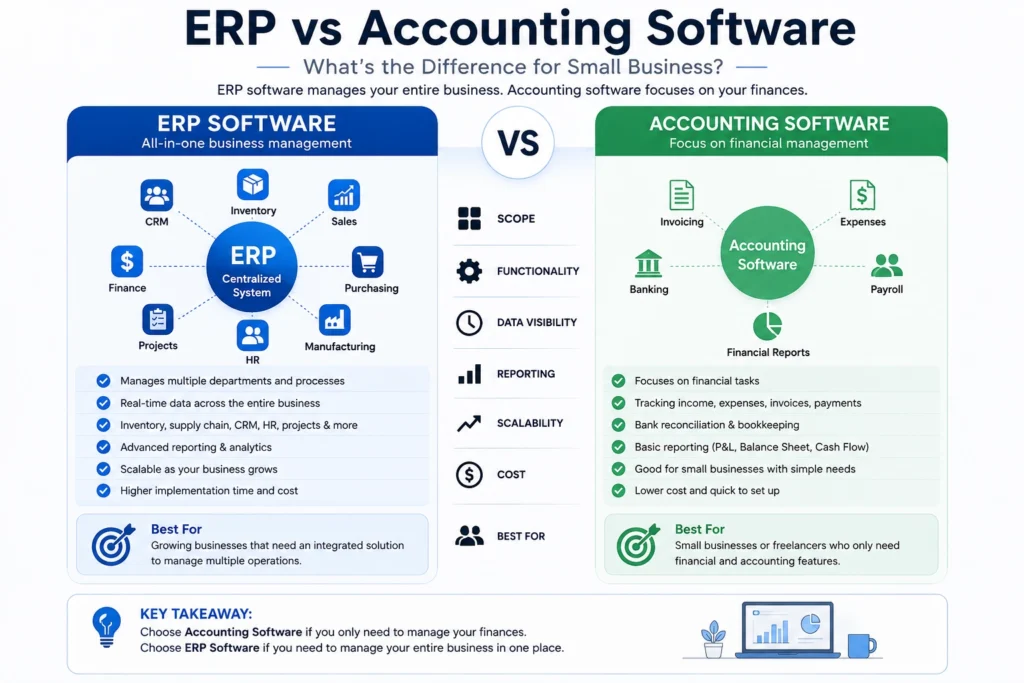
ERP vs Accounting Software: What’s the Difference?
Accounting software primarily focuses on financial management.
ERP software typically goes further by connecting financial information with other business processes.
For example:
Accounting software:
Sales → Invoice → Financial records
ERP:
Sales → Customer → Inventory → Purchasing → Warehouse → Invoice → Accounting → Reporting
For a small business with simple operations, accounting software may be enough.
For a growing business with multiple connected processes, an ERP can provide much greater visibility.
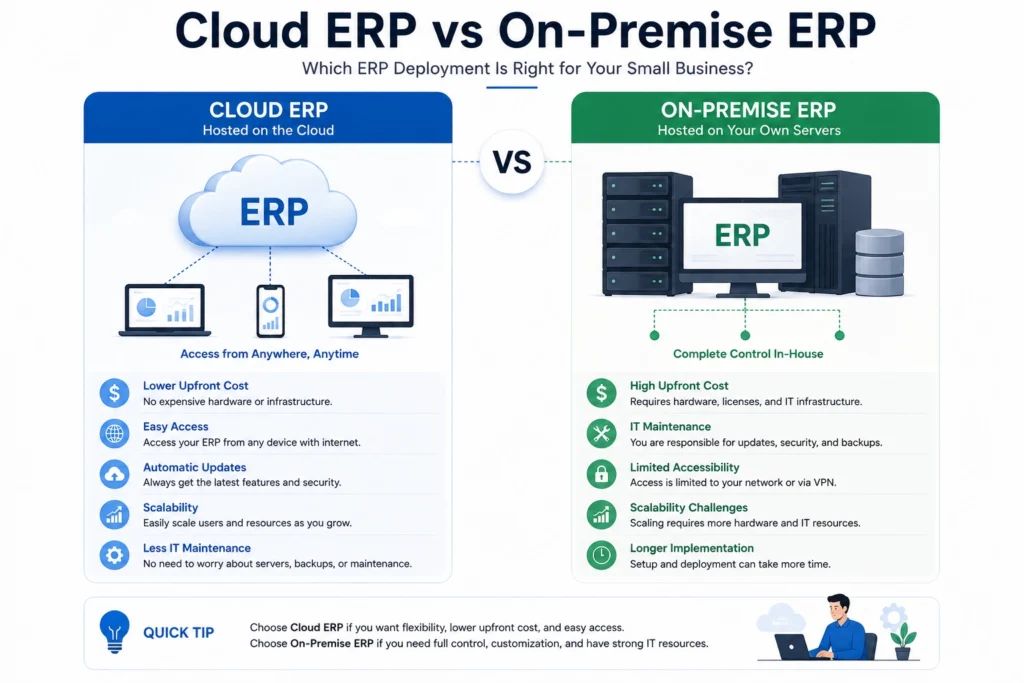
Cloud ERP vs On-Premise ERP
Another important decision is where the software will run.
Cloud ERP
Cloud ERP is hosted by the provider and accessed through the internet.
Advantages
- No internal server management
- Easier remote access
- Automatic infrastructure maintenance
- Easier scaling
- Usually subscription-based
On-Premise ERP
With on-premise ERP, the company hosts the software on its own infrastructure or manages a dedicated environment.
Advantages
- Greater infrastructure control
- More customization possibilities
- Can suit organizations with specific IT requirements
Disadvantages
- Higher infrastructure responsibility
- IT expertise required
- Maintenance costs
- More complex upgrades
For many small businesses, cloud ERP is the simpler starting point.
How to Choose the Right ERP for Your Small Business
Don’t start by asking:
“Which ERP is the best?”
Instead, ask:
“Which ERP is the best for our business?”
Use this process.
Step 1: Identify Your Biggest Problems
Write down the processes that currently waste the most time.
Step 2: Define Your Must-Have Features
Separate essential features from features that would simply be nice to have.
Step 3: Set a Realistic Budget
Consider both subscription costs and implementation costs.
Step 4: Consider Your Growth
Don’t choose software only for the company you have today.
Think about where the company could be in three to five years.
Step 5: Test the Software
Whenever possible, use a free trial, demo, or sandbox environment.
Step 6: Calculate Total Cost of Ownership
Look beyond the monthly subscription.
Include:
- Setup
- Migration
- Training
- Customization
- Integrations
- Support
Step 7: Evaluate Implementation Partners
For many ERP systems, the implementation partner can be almost as important as the software itself.
A good implementation partner can help configure the system around your real business processes rather than forcing your team into an inefficient workflow.
Best ERP Software by Business Type
Best ERP for Small Retail Businesses
Odoo can be a strong choice because of its combination of sales, inventory, eCommerce, accounting, and point-of-sale functionality.
Best ERP for Manufacturing
Consider SAP Business One, Odoo, Acumatica, Business Central, or a manufacturing-focused platform such as Cetec ERP.
Best ERP for Microsoft-Based Companies
Microsoft Dynamics 365 Business Central is the obvious platform to evaluate first.
Best ERP for Finance-Heavy Businesses
Sage Intacct is worth considering when advanced financial management is the priority.
Best Open-Source ERP
ERPNext is one of the strongest choices for organizations that want open-source software and have the technical resources to manage it.
Best ERP for Rapidly Growing Companies
NetSuite, Acumatica, and Business Central are worth evaluating when scalability is a major requirement.
Common ERP Mistakes Small Businesses Should Avoid
Choosing an ERP is a major decision, and small businesses can make several expensive mistakes.
Choosing Based Only on Price
The cheapest ERP may become expensive if it requires extensive customization or cannot scale with your business.
Buying Too Much Software
A small business doesn’t necessarily need an enterprise-level platform.
Ignoring Implementation Costs
Software licenses are only part of the total investment.
Failing to Involve Employees
The people who use the ERP every day should be involved in the selection process.
Migrating Bad Data
Moving inaccurate or duplicated data into a new ERP can create even bigger problems.
Over-Customizing the Platform
Customization can be useful, but excessive customization can make upgrades and maintenance harder.
Frequently Asked Questions
What is the best ERP software for small business?
There is no universal winner. Odoo is one of the strongest choices for small businesses looking for broad functionality and relatively accessible pricing, while Business Central, NetSuite, and Acumatica may be better for companies with more complex or rapidly growing operations.
What is the cheapest ERP for a small business?
Open-source platforms such as ERPNext can have very low software licensing costs when self-hosted. Odoo also offers a free single-app option and paid plans starting at $24.90 per user per month when billed annually.
Is ERP software worth it for a small business?
It can be, especially when disconnected systems, manual processes, inventory problems, or reporting issues are slowing down the business. However, very small companies with simple operations may not need a full ERP.
Can a small business use ERP software?
Yes. Modern ERP platforms increasingly target small and midsize businesses. The key is choosing a system whose complexity and cost match the company’s needs.
Is Odoo good for small businesses?
Yes. Odoo provides a wide range of integrated applications and currently offers a Standard plan at $24.90 per user per month when billed annually.
Is Microsoft Dynamics 365 Business Central good for small businesses?
It can be an excellent option for growing small businesses, especially those already using Microsoft products. Microsoft currently lists Business Central Essentials at $80 per user per month and Premium at $110 per user per month, paid yearly.
What is the difference between ERP and CRM?
CRM primarily focuses on customer relationships, leads, sales, and marketing. ERP covers a broader range of business processes, including finance, inventory, purchasing, operations, and sometimes CRM.
Should a small business choose cloud ERP?
For many small businesses, cloud ERP is the most convenient option because it reduces the need to manage servers and infrastructure internally.
Final Verdict
The best ERP software for a small business is not necessarily the platform with the longest feature list or the lowest subscription price.
It is the system that solves your biggest operational problems without creating unnecessary complexity.
For many small businesses, Odoo is an excellent starting point because it combines broad functionality with relatively accessible pricing.
Microsoft Dynamics 365 Business Central is particularly compelling for companies already invested in the Microsoft ecosystem.
NetSuite and Acumatica make more sense when scalability and sophisticated business operations are priorities, while ERPNext stands out for businesses that want an open-source approach.
Before making a decision, compare the software, implementation requirements, integrations, support, and total cost of ownership—not just the monthly license.
The right ERP should make your business easier to manage today while giving you enough room to grow tomorrow.