
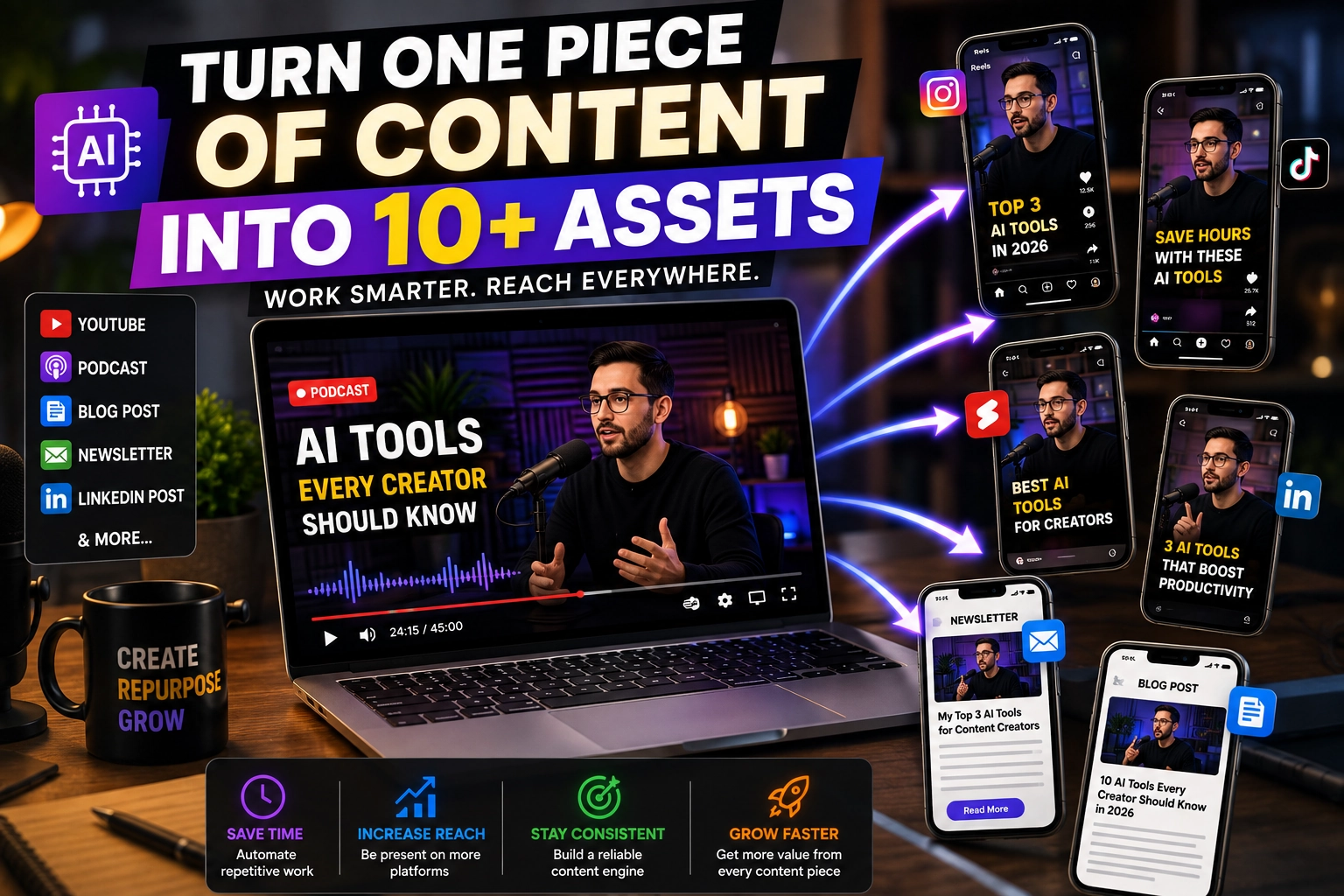
Best AI Content Repurposing Tools in 2026: Turn One Piece Into 10+
Creating great content takes time.
But what if you didn’t have to create completely new content for every platform?
A single YouTube video can become several Shorts, Instagram Reels, TikTok videos, LinkedIn posts, a newsletter, a blog article, and multiple social media updates.
That’s the idea behind content repurposing.
Instead of creating 10 pieces of content from scratch, you start with one strong piece of content and adapt it into multiple formats.
And in 2026, AI is making that process significantly faster.
The best AI content repurposing tools can analyze long-form videos, podcasts, articles, and other content, identify important ideas or moments, and help transform them into platform-specific content.
In this guide, we’ll compare the best AI content repurposing tools in 2026, explain what each one does best, and show you how to build a simple workflow that can turn one piece of content into an entire week—or more—of content.
What Is AI Content Repurposing?
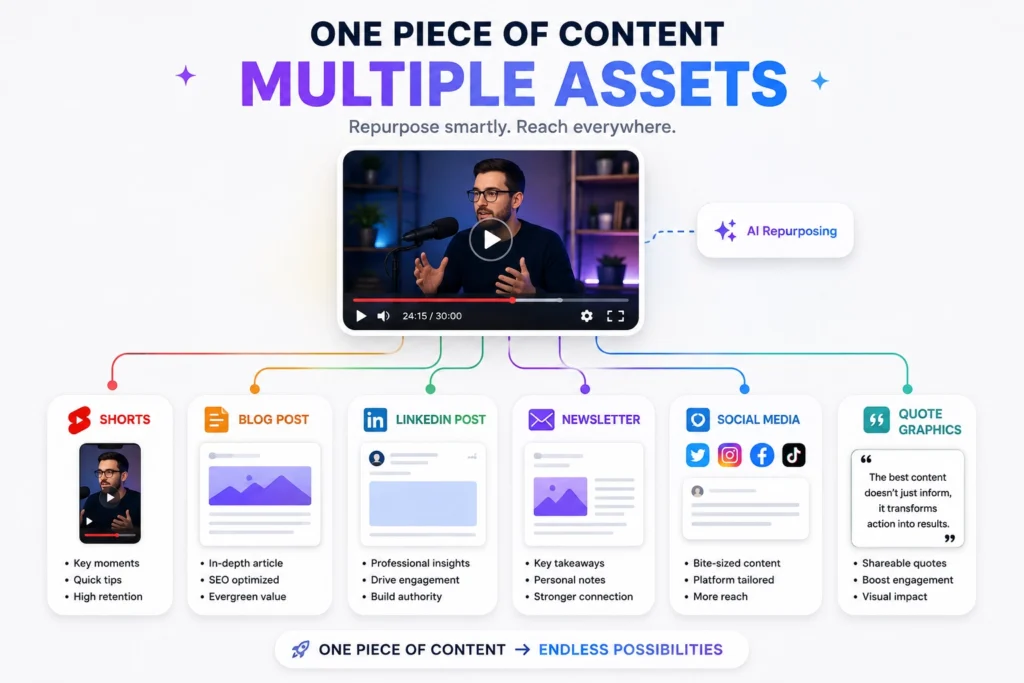
AI content repurposing is the process of using artificial intelligence to transform existing content into new formats and adapt it for different platforms.
For example, imagine you’ve published a 30-minute YouTube video about AI tools.
Instead of stopping after publishing the video, you could turn it into:
- 5–10 short-form videos
- Instagram Reels
- TikTok clips
- YouTube Shorts
- LinkedIn posts
- X posts
- A newsletter
- A blog article
- Quote graphics
- Social captions
The important point is that you’re not simply copying and pasting the same content everywhere.
Good repurposing adapts the original idea to the audience and format of each platform.
For example:
YouTube: detailed explanation
YouTube Shorts: one useful takeaway
LinkedIn: professional insight
Newsletter: deeper analysis
Instagram: visual summary
AI tools can automate much of the transformation process, while you remain responsible for the final ideas, accuracy, voice, and quality.
Why Content Repurposing Matters in 2026
The biggest challenge for creators isn’t necessarily coming up with ideas.
It’s producing enough high-quality content consistently.
Creating every post from scratch can quickly become exhausting.
Content repurposing solves part of that problem by allowing creators to extract more value from content they’ve already created.
A well-produced podcast episode, webinar, interview, or YouTube video can contain dozens of useful ideas.
Instead of using those ideas once, repurposing lets you distribute them across multiple channels.
Current AI repurposing platforms increasingly support workflows that go beyond simple clipping. For example, Repurpose.io focuses on automated cross-platform distribution, resizing, scheduling, and content workflows, while Tugan.ai focuses on turning existing videos, articles, and URLs into written formats such as LinkedIn posts, newsletters, and threads.
That makes repurposing less about creating more work and more about building a repeatable content system.
Best AI Content Repurposing Tools in 2026
Quick Comparison
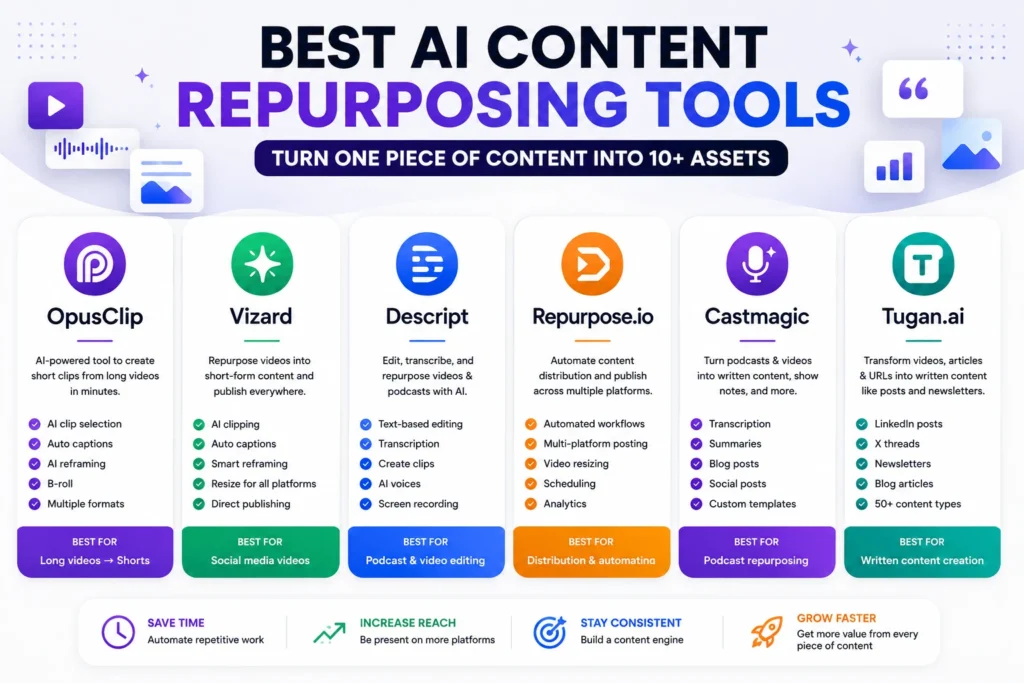
| Tool | Best For | Main Strength | Content Type |
|---|---|---|---|
| OpusClip | Video creators | Long video → short clips | Video |
| Vizard | Social video | Clips + resizing + publishing | Video |
| Descript | Video & podcast creators | Editing + AI repurposing | Video & Audio |
| Repurpose.io | Distribution | Automated publishing | Video, images & social |
| Castmagic | Podcasts | Audio/video → content | Audio & Video |
| Tugan.ai | Written repurposing | Video/article → posts | Text |
| Pictory | Video creation | Text/video transformation | Video |
| Munch | Short-form content | Content extraction | Video |
Quick recommendation: If your main goal is turning long videos into Shorts, start with OpusClip or Vizard. If you want to turn podcasts and videos into written content, Castmagic or Tugan.ai are more suitable. If distribution automation is the priority, Repurpose.io stands out.
1. OpusClip — Best AI Tool for Turning Long Videos Into Shorts
Best for: YouTubers, podcasters, coaches, and social media creators.
OpusClip is one of the most useful AI tools for creators who already produce long-form videos.
Its core idea is simple:
One long video → multiple short videos.
The platform analyzes long-form footage and identifies moments that could work as short-form clips. It also supports AI captioning, reframing, B-roll, and other editing features.
This makes it particularly useful if you regularly publish:
- YouTube videos
- Podcasts
- Interviews
- Webinars
- Educational videos
- Talking-head content
For example, a 45-minute podcast might contain several moments that work independently as Shorts.
Instead of manually watching the entire episode and searching for clips, OpusClip can help identify potential highlights.
Key Features
- AI clipping
- Automatic captions
- AI reframing
- AI B-roll
- Short-form optimization
- Multiple video formats
- Social publishing features
Pros
- Excellent for long-to-short video
- Saves editing time
- Good for social content
- Useful automatic reframing
Cons
- Primarily focused on video
- AI-selected clips still need human review
- Advanced usage may require a paid plan
Best for
Creators whose main content format is video.
2. Vizard — Best for Social Media Video Repurposing
Best for: Turning YouTube videos, webinars, podcasts, and interviews into social clips.
Vizard focuses heavily on converting long-form video into short-form content.
Its AI can transcribe a video, identify speakers and useful moments, create clips, resize them for different platforms, and add captions.
The platform supports formats such as:
- YouTube Shorts
- TikTok
- Instagram Reels
One particularly useful feature is automatic reframing, which helps keep the active speaker positioned correctly when converting a horizontal video into a vertical format.
Example Workflow
YouTube Video
↓
AI identifies highlights
↓
Create short clips
↓
9:16 vertical format
↓
Captions
↓
Publish
Vizard also offers scheduling and direct publishing capabilities, making it more than just a clipping tool.
Pros
- Simple workflow
- Strong social-media focus
- Automatic captions
- Smart reframing
- Direct publishing
- Useful for beginners
Cons
- Primarily focused on video
- Generated clips still require editing
- Best results depend on good source footage
Best for
Creators who want to turn one long video into social content quickly.
3. Descript — Best for Editing and Repurposing Video
Best for: Video creators, podcasters, and teams that want editing and repurposing in one platform.
Descript takes a different approach.
Instead of treating video editing purely as a timeline-based process, it lets you work with a transcript and edit the video through text.
Its AI features include video clipping, transcription, captions, translation, AI voice tools, video regeneration, and other editing functions.
Its Create Clips feature can analyze long-form content and generate shorter clips for social media. Users can choose the number and length of clips and then edit each generated composition.
This makes Descript particularly useful if you want AI automation without giving up editing control.
Best Uses
- Podcasts
- Interviews
- YouTube videos
- Tutorials
- Educational videos
- Video podcasts
Pros
- Excellent transcript-based editing
- Strong AI editing tools
- Clip generation
- Audio and video support
- Good control over final content
Cons
- More features can mean a bigger learning curve
- Not as focused purely on automated distribution as Repurpose.io
Best for
Creators who want AI assistance but still want to control the editing process.
4. Repurpose.io — Best for Automated Content Distribution
Best for: Creators and businesses publishing content across multiple platforms.
Repurpose.io focuses less on generating new content and more on automating what happens after you create it.
The platform can connect social accounts and create workflows that automatically move content from one platform to another.
It supports platforms including YouTube, TikTok, Instagram, Facebook, Snapchat, Pinterest, LinkedIn, X, and others.
For example:
YouTube
↓
Repurpose.io
↓
TikTok + Instagram + Facebook + Shorts
This can eliminate repetitive downloading, resizing, uploading, and publishing.
Repurpose.io also supports image repurposing and stories, expanding beyond video-only workflows.
Pros
- Excellent automation
- Multi-platform distribution
- Workflow system
- Scheduling
- Video resizing
- Image repurposing
Cons
- Less focused on generating written content
- Automation can require initial setup
- You still need good source content
Best for
Creators who already have content and want to distribute it efficiently.
5. Castmagic — Best for Podcast Repurposing
Best for: Podcasters, content teams, and businesses producing long-form audio or video.
Castmagic is designed around a simple concept:
Long-form media contains many pieces of useful content.
The platform can import audio and video from sources such as YouTube, Vimeo, Instagram, RSS feeds, and other platforms, then use AI to transcribe, summarize, and generate additional content.
A podcast episode can become:
- Show notes
- Blog content
- Social posts
- Quotes
- Summaries
- Marketing content
- Other written assets
This makes Castmagic especially useful for podcast-heavy content strategies.
Pros
- Strong podcast workflow
- Transcription
- Content generation
- Brand-voice features
- Useful for teams
Cons
- More specialized than general-purpose repurposing platforms
- Less focused on short-form video clipping
Best for
Podcasters who want to turn each episode into a larger content package.
6. Tugan.ai — Best for Turning Content Into Written Posts
Best for: Marketers, founders, bloggers, and creators who want written content from existing content.
Tugan.ai takes a context-first approach.
Instead of asking AI to create something from a vague prompt, you provide an existing source such as a YouTube video, article, transcript, or URL.
It can then transform that source into formats including:
- LinkedIn posts
- X threads
- Newsletters
- Blog posts
- Email sequences
- Social posts
- Captions
Its current tool collection includes transformations such as YouTube-to-blog, YouTube-to-newsletter, podcast-to-blog, article-to-LinkedIn, and many others.
That makes it particularly interesting for creators who don’t necessarily need another video editor.
Pros
- Excellent for written repurposing
- Works from real source material
- Many output formats
- Useful for marketers
- Good for social content
Cons
- Not primarily a video clip generator
- Human editing is still important
- Quality depends heavily on the source
Best for
Turning one article, video, or podcast into multiple written assets.
7. Pictory — Best for Text-to-Video Repurposing
Best for: Bloggers, marketers, and creators who want to turn written content into video.
Pictory is useful when your starting point isn’t necessarily a video.
For example, you might already have:
Blog post → Video
or:
Script → Video
This makes it a useful complement to video clipping tools.
Instead of starting with a camera, creators can start with written content and turn it into visual content.
Best Uses
- Blog-to-video
- Marketing videos
- Educational content
- Social media videos
- Presentations
Pros
- Useful for non-video creators
- Text-to-video workflow
- Marketing-friendly
- Easier than traditional video editing
Cons
- Less specialized in long-video clipping
- Stock/AI visual selection still needs review
Best for
Bloggers and marketers who want to add video to their existing content strategy.
8. Munch — Best for Extracting Short-Form Content
Best for: Creators who want to identify useful moments in long videos.
Munch is another option for transforming long-form content into shorter social content.
Its core value is finding sections of longer videos that have potential as short-form content and adapting them for social platforms.
This can be particularly useful for:
- Interviews
- Podcasts
- Webinars
- Educational videos
- Long YouTube videos
The main advantage is that you don’t have to manually search through every minute of a long recording to find potential clips.
AI Content Repurposing Tools: Which One Should You Choose?
The best tool depends on your source content.
If You Create YouTube Videos
Choose:
OpusClip or Vizard
They’re particularly useful for extracting short-form clips from long-form video.
If You Create Podcasts
Choose:
Castmagic or Descript
They can help transform long-form audio/video into clips, transcripts, summaries, and written content.
If You Want Written Social Content
Choose:
Tugan.ai
It’s designed around transforming source material into platform-specific written content.
If You Want Automatic Distribution
Choose:
Repurpose.io
Its strength is connecting platforms and automating publishing workflows.
If You’re a Blogger
Choose:
Pictory + Tugan.ai
One can help turn written ideas into video while the other can transform content into additional written formats.
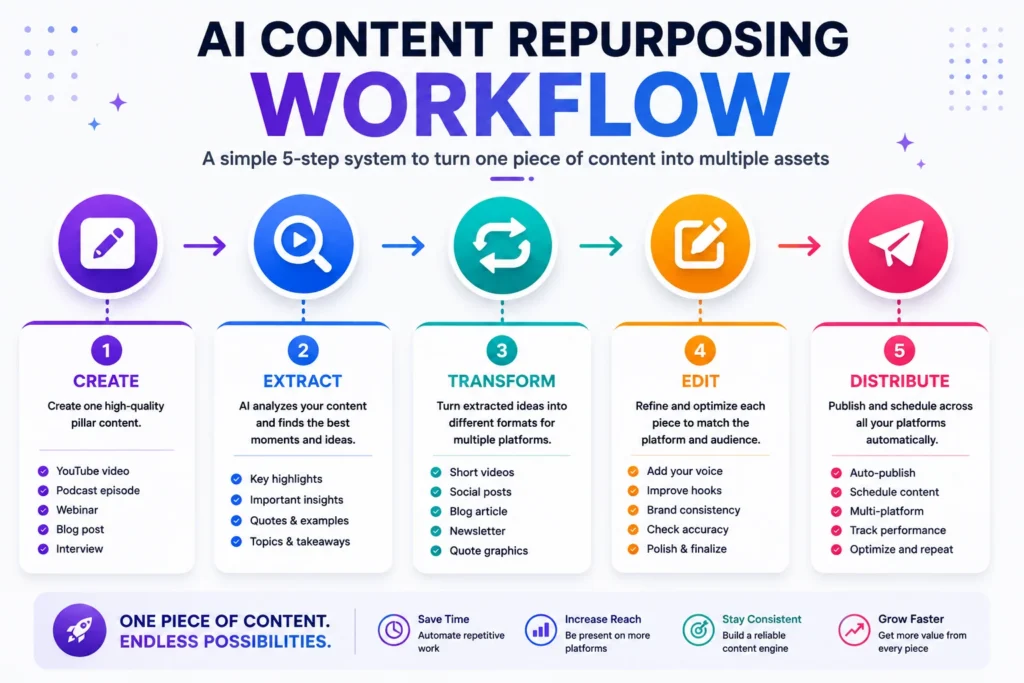
How to Repurpose One Piece of Content Into 10+ Assets
This is where AI content repurposing becomes really powerful.
Imagine you publish a:
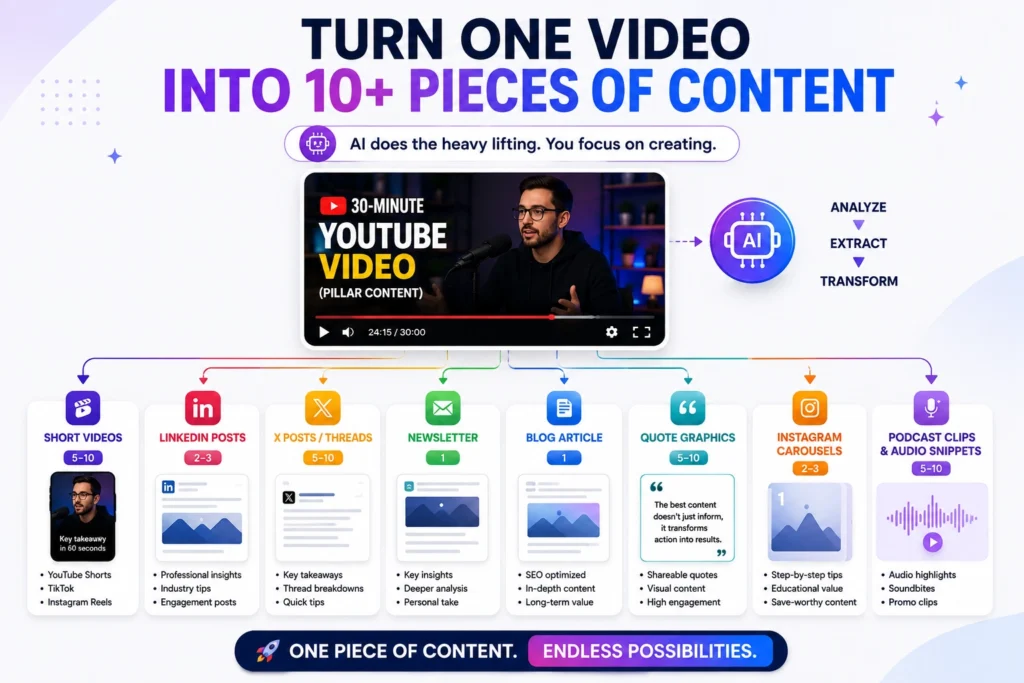
30-Minute YouTube Video
Topic:
“10 AI Tools Every Small Business Should Know”
Instead of publishing it once, build a content system around it.
Step 1 — Create the Main Video
The YouTube video becomes your pillar content.
It contains all the important information.
Step 2 — Extract Short Videos
Use:
OpusClip or Vizard
Create 5–10 short clips.
For example:
- Best AI writing tool
- Best AI image generator
- Best AI automation tool
- Biggest AI mistake
- One AI tool every business should try
Step 3 — Create LinkedIn Content
Take the most useful insights and create:
- 2–3 LinkedIn posts
- 1 carousel idea
- 1 discussion question
Step 4 — Create X Posts
Turn individual insights into short posts or threads.
Step 5 — Create a Newsletter
Summarize the key lessons into a newsletter.
Step 6 — Create a Blog Article
Expand the video into a detailed article optimized around a relevant search query.
Step 7 — Create Visual Content
Turn important statistics, quotes, or lessons into:
- Instagram graphics
- Pinterest pins
- Quote cards
Now one video has become a complete content campaign.
A Simple AI Content Repurposing Workflow
You don’t need eight different subscriptions.
A simple workflow can look like this:
YouTube Video
↓
OpusClip / Vizard
↓
Shorts + Reels + TikToks
↓
Descript
↓
Clean editing + captions
↓
Tugan.ai
↓
LinkedIn + X + Newsletter
↓
Repurpose.io
↓
Distribution
This separates the process into three stages:
1. Extract
Find the best ideas and moments.
2. Transform
Convert them into platform-specific formats.
3. Distribute
Publish and schedule them.
That is a much more sustainable system than manually recreating every post.
AI Repurposing Does Not Mean Copy and Paste
One of the biggest mistakes creators make is publishing identical content everywhere.
A YouTube audience and a LinkedIn audience don’t necessarily want the same thing.
For example:
YouTube
“Here are 10 AI tools that can save small businesses hours every week…”
“Most businesses don’t need 50 AI tools. They need three tools that remove repetitive work.”
3 AI tools every small business should try
Newsletter
The three AI tools I’d actually pay for
They’re based on the same source.
But each format has a different hook.
That distinction is important.
A recent 2026 repurposing framework from Tugan.ai similarly emphasizes starting with a strong source, generating platform-native variations, editing for the creator’s voice, and then measuring what performs.
How to Avoid Low-Quality AI Repurposed Content
Automation doesn’t automatically equal quality.
If you publish dozens of generic AI posts every week, your content can quickly become repetitive.
Instead:
Keep the original idea
AI should transform your content—not replace your point of view.
Edit the output
Check:
- Facts
- Tone
- Examples
- Grammar
- Hooks
- Brand voice
Make every platform native
Don’t simply paste a LinkedIn post onto X.
Adapt it.
Add something new
Include:
- Personal experience
- Original examples
- Data
- Opinions
- Commentary
- Lessons learned
The goal isn’t to produce more content at any cost.
It’s to get more value from content you’ve already created.
AI Content Repurposing vs Creating From Scratch
| Factor | From Scratch | AI Repurposing |
|---|---|---|
| Research | High | Lower |
| Writing time | High | Lower |
| Editing | High | Moderate |
| Number of outputs | Limited | Much higher |
| Consistency | Harder | Easier |
| Originality | High potential | Depends on editing |
| Automation | Low | High |
| Best use | New ideas | Existing content |
The best strategy isn’t choosing one or the other.
Use both.
Create high-quality original pillar content, then use AI to extend its lifespan.
How Many Pieces of Content Can You Get From One Video?
There isn’t a fixed number.
It depends on:
- Video length
- Information density
- Number of topics
- Quality of the recording
- Audience
- Platform
- Content format
But a strong 30–60 minute video can potentially provide enough material for multiple short clips and written assets.
For example:
1 YouTube video
→ 5 Shorts
→ 3 LinkedIn posts
→ 1 newsletter
→ 1 blog article
→ 10 X posts
→ 3 Instagram captions
That’s 23 potential assets from one source.
You don’t have to publish all of them.
Choose the strongest pieces.
Are AI Content Repurposing Tools Worth It?
For creators who publish regularly, they can be.
The biggest benefit isn’t necessarily that AI creates content better than humans.
It’s that AI can reduce repetitive work.
Instead of spending an hour:
watching a 45-minute video to find three clips,
you can let AI identify potential clips and spend your time reviewing and improving them.
Instead of writing the same idea five times:
You can create the core idea once and adapt it for different platforms.
That’s where the real value lies.
Best AI Content Repurposing Stack for Creators in 2026
If I were building a simple creator workflow, I wouldn’t subscribe to every tool in this list.
I’d start with:
For Video
OpusClip
Long video → Shorts/Reels/TikTok.
For Editing
Descript
Clean up the clips and control the final result.
For Written Content
Tugan.ai
Video/article → LinkedIn/X/newsletter/blog formats.
For Distribution
Repurpose.io
Automate publishing and cross-platform workflows.
This gives you four distinct functions:
Extract → Edit → Transform → Distribute
That’s enough for most creators.
Frequently Asked Questions
What is the best AI content repurposing tool in 2026?
There isn’t one universal winner. OpusClip is a strong choice for long-form video to short-form clips, Vizard is useful for social video workflows, Tugan.ai is strong for written repurposing, and Repurpose.io is focused on automated distribution.
What is the best AI tool for turning YouTube videos into Shorts?
OpusClip and Vizard are strong options. Both are designed to analyze long-form video and create short-form content for social platforms.
Can AI turn a podcast into social media content?
Yes. Tools such as Castmagic and Tugan.ai can use podcast or video content as a source for transcripts, summaries, social posts, newsletters, and other formats.
Can AI turn a blog post into social media posts?
Yes. Context-based repurposing tools can transform an article into formats such as LinkedIn posts, X threads, newsletters, and captions. Tugan.ai, for example, provides several article-to-social workflows.
Is AI content repurposing the same as duplicate content?
Not necessarily.
Good repurposing adapts the original idea to different formats and audiences. Simply publishing identical content everywhere isn’t a strong strategy.
How many pieces of content can one video produce?
There is no fixed number. A strong long-form video can potentially produce several short clips, social posts, a newsletter, a blog article, and other assets. The actual number depends on the video’s length and information density.
Should I use AI to automatically publish everything?
Automation can save time, but it’s better to review important content before publication. AI can select the wrong clip, misunderstand context, or create an awkward caption.
Is AI content repurposing good for small businesses?
Yes. Small businesses can use it to turn webinars, product videos, interviews, podcasts, and educational content into multiple marketing assets without creating each one from scratch.
Can AI repurposing replace a content creator?
No.
AI can automate repetitive tasks, but strategy, expertise, storytelling, opinions, editing decisions, and quality control still benefit from human input.
Final Verdict
The best AI content repurposing strategy isn’t about finding a tool that magically turns one video into hundreds of posts.
It’s about building a repeatable system.
Start with one strong piece of content.
Then:
Create → Extract → Transform → Edit → Distribute → Measure
For video creators, OpusClip and Vizard are excellent places to start.
For creators working with podcasts and long-form media, Castmagic and Descript offer more comprehensive workflows.
For written content, Tugan.ai is particularly useful.
And if your biggest problem is publishing the same content across multiple platforms, Repurpose.io can automate much of the distribution process.
The real advantage of AI isn’t simply creating more.
It’s getting more value from the content you’ve already worked hard to create.
[…] Best AI Content Repurposing Tools in 2026 | Turn 1 Into 10 […]